opensource.google.com

Menu

Efficient emulation of quantum circuits for chemistry

Thursday, November 4, 2021

The Google Quantum AI team spends a lot of time developing simulators for quantum hardware and quantum circuits. These simulators are invaluable tools for our entire quantum computing stack. We use them for everything, from algorithm design to defining the boundaries of beyond classical computation, having to do with building useful quantum computers. But there are limits to what we can simulate efficiently. In general, simulating quantum systems with a classical computer incurs exponential cost in CPU time or memory space. To fight the exponential growth we develop more efficient algorithms allowing us to further our ability to simulate large quantum systems.

In this post we describe joint work with our collaborators at QSimulate to develop the Fermionic Quantum Emulator, a fast emulator of quantum circuits that simulates the behavior of electrons. Efficiency gains in this particular area are exciting because simulating fermions is known to be challenging and an area we suspect to have a substantial quantum advantage. The Fermionic Quantum Emulator (FQE) adds to our portfolio of simulators for quantum hardware, quantum error correction, and quantum circuits and provides the capability to simulate even large quantum systems in an effort to evaluate beyond classical physics simulations. The emulator slots into our set of open source software tools for quantum information and is completely interoperable with OpenFermion. The code is Python based with C-extensions for computational hotspots letting us gain performance without sacrificing readability or ease of distribution. For complete details, see the open access publication or check out the code!

Prelude: The cost of quantum simulation

To store the vector of numbers at double precision representing the wavefunction of 26 qubits requires approximately 1 Gigabyte memory. By the time we add 10 more qubits to our calculations we need a Terabyte of memory. In terms of simulations of molecules or materials, 36 qubits is quite small–translating to a modest accuracy simulation of the electrons in diatomic or small molecules. Simulations of electrons in more complicated molecules can require hundreds of qubits to accurately represent nature and provide the scientific insight chemists need to reason about reaction mechanisms. What this means for quantum algorithm developers who focus on physics simulation is that even testing algorithms at a small scale prior to running them on a quantum device can be a serious computational undertaking.

We can temper the exponential scaling of direct simulation by exploiting physical symmetries when we know our circuits are simulating a particular type of quantum particle. If we allow ourselves to move away from direct simulation of the quantum device and relax our simulation requirements to emulation we get a lot more wiggle room in terms of algorithm design. The Fermionic Quantum Emulator takes this approach to circuit simulation and achieves substantial computational advantage over generic quantum circuit simulators that do not make physical symmetry considerations.

The Fermionic Quantum Emulator:

The Fermionic Quantum Emulator (FQE) is a state vector simulator that takes advantage of common symmetries of fermionic spin-1/2 systems which can drastically reduce the memory required to represent a quantum state in memory. Using a symmetry-reduced wavefunction representation allows us to make further algorithmic improvements when simulating arbitrary fermionic generators (many-body quantum gates) and standard non-relativistic chemical Hamiltonians. These improvements are obtained by adapting algorithms developed in the theoretical chemistry community for exact fermionic simulations.

For a system where the number of electrons is equal to half the total qubits required to simulate the system we see modest improvements and can store a 36 qubit wavefunction with 37 Gigabytes of memory–substantial savings when considering the qubit wavefunction without symmetries considered requires 1000 Gigabytes. For lower filling systems we see even more substantial advantages. To emphasize this point we plot the ratio of the sizes required to represent wavefunctions in the symmetry-reduced representation used by FQE and the more expensive qubit representation.
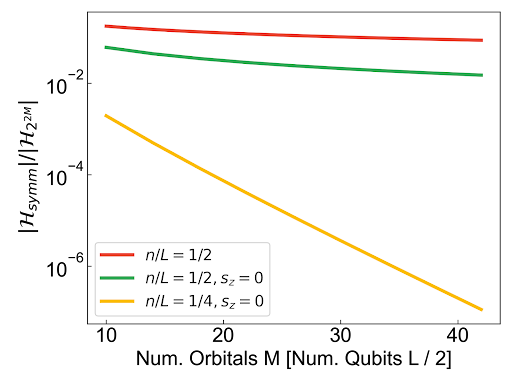
Graph showing the ratio of requirements for circuit simulation when considering physical symmetries versus direct simulation of qubits
The ratio of memory requirements for circuit simulation when considering physical symmetries versus direct simulation of qubits. Chemistry and materials Hamiltonians commute with the number and spin operators so we can focus on simulating the wavefunction in only the relevant symmetry sectors. As shown by the yellow line (quarter filling) this can lead to substantial savings. For a quarter filling wavefunction on 48 qubits (24 orbitals) we would need 290 Gb and a qubit simulation would require 4.5 Petabytes.

Emulating quantum circuits pertaining to fermionic dynamics allows us to be more clever with our simulation algorithms instead of a direct simulation of the quantum gates. For example, instead of translating fermionic generators to qubit generators using standard techniques the FQE provides routines for directly evolving common circuit primitives and arbitrary fermionic generators. The structure of common algorithmic primitives, such as basis rotations or diagonal Coulomb operators, allows us to write very fast routines for evolving symmetry-reduced wavefunctions. Below we plot the performance of one of these primitives (basis rotations) and compare the performance of FQE with a highly optimized Qsim program written in C++. In both a single threaded and multithreaded regime the FQE outperforms Qsim by at least an order of magnitude; clearly demonstrating that physics and symmetry considerations coupled with algorithmic improvements can have substantial computational advantages.
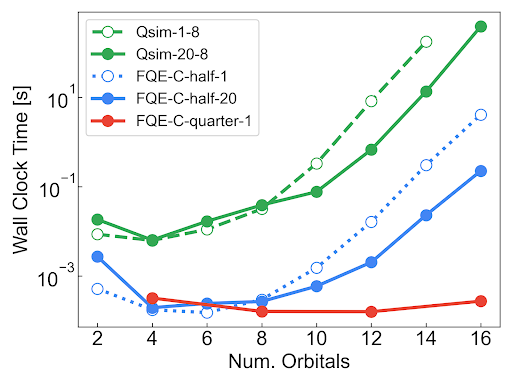
CPU Walk clock time for the the basis rotation primitive C-kernel primitive versus an equivalent circuit evolution time with Qsim.

The code, getting involved, and future directions:

The FQE is a python package with easily extensible modules for maximum flexibility. We have accelerated some computational hotspots with C-kernels and provide users the ability to easily toggle between these two modes. The C-kernels are further accelerated with OpenMP. Installation uses the standard python C-extension workflow and does not require specific linking to BLAS routines. Pointers to these routines are obtained from Numpy and Scipy lowering burden programmers and computational physicists using the software.

The FQE is completely interoperable with OpenFermion but can also be used as a standalone fermionic simulator. We have built in functionality that generates many standard sets of observables for fermionic simulation (arbitrary expectation values and reduced density matrices). The FQE also has custom routines for standard quantum chemistry Hamiltonians that further exploit the symmetry in a spin-restricted setting for more computational efficiency.

The FQE is, and will remain, Apache 2 open source. We welcome pull requests, issues, or general commentary on how we can improve the emulator. Our hope is that you can use the FQE to accelerate explorations of quantum algorithms, as a general purpose tool for simulating time-dynamics of fermions, and as the start of a family of methods for emulating fermionic circuits. To get started check out this tutorial and this example on simulating spin-charge separation in the Fermi Hubbard model.

We depend on simulations to understand which problems quantum computers may be able to solve, and when. The FQE enables us to stretch further into the realm of difficult simulations of fermionic systems and increase our research velocity. Looking forward, the FQE is the start of a general framework for extending various qubit simulation techniques to the fermionic setting which will help us define the frontier of quantum computational relevancy and quantum simulation advances.

By Nicholas Rubin - Senior Research Scientist


Announcing Knative 1.0!

Tuesday, November 2, 2021


Today, the Knative project released version 1.0, reaching an important milestone that was possible thanks to the contributions and collaboration of over 600 developers. Over the last three years, Knative became the most widely-installed serverless layer on Kubernetes.

The Knative project was released by Google in July 2018, with the vision to systemize best practices in cloud native application development, with a focus on three areas: building containers, serving and scaling workloads, and eventing. It delivers an essential set of components to build and run serverless applications on Kubernetes, allowing webhooks and services to scale automatically, even down to zero. Open-sourcing this technology provided the industry with essential base primitives that are shared by all. Knative was developed in close collaboration with IBM, Red Hat, SAP, VMWare, and over 50 different companies. Google offers Cloud Run for Anthos for managed Knative serving that will be Knative 1.0 conformant.

The road to 1.0

Autoscaling (including scaling to zero), revision tracking, and abstractions for developers were some of the early goals of Knative. In addition to delivering on those goals, the project also incorporated support for multiple HTTP routing layers, support for multiple storage layers for Eventing concepts with common Subscription methods, and designed a “Duck types” abstraction to allow processing arbitrary Kubernetes resources that have common fields, to name a few changes.

Knative is now available at 1.0, and while the API is closed for changes, its definition is publicly available so anyone can demonstrate Knative conformance. This stable API allows customers and vendors to support portability of applications, and establishes a new cloud native developer architecture.

Get started with Knative 1.0

Install Knative 1.0 using the documentation on the website. Learn more about the 1.0 release on the Knative blog, and at the Knative community meetup on November 17, 2021, where you'll hear about the latest changes coming with Knative 1.0 from maintainer Ville Aikas. Join the Knative Slack space to ask questions and troubleshoot issues as you get acquainted with the project.

By María Cruz, Program Manager – Google Open Source

Server-side Apply in Kubernetes

Friday, October 29, 2021

What is Server-side Apply?

One of the highest velocity OSS projects of all time, Kubernetes is a cornerstone of Google’s cloud strategy. By providing an abstraction layer between users’ workloads and the underlying infrastructure, Kubernetes enables managing containerized workloads and services across--and migration from--both public cloud competitors and on-premise data centers.

In Config & Policy Automation (CPA) [1], in the Kubernetes Kernel team we aim to improve API expressiveness in Kubernetes so that more powerful controllers, tools, and UIs can be built using these APIs. The expressiveness and having better controllers, tools, and UIs are important to Google because they enable the ecosystem, and make it more sticky. It increases the ability to make more reliable systems that are simpler with better user experiences.

Bringing Server-side Apply to Kubernetes is one of the efforts led by Google to reduce fragmentation in clients, improve automation, and set Kubernetes up for ongoing success. Server-side Apply helps users and controllers manage their resources through declarative configurations. Clients can create and modify their objects declaratively by sending their fully specified intent. Server-side Apply replaces the client side apply feature implemented by “kubectl apply” with a Server-side implementation, permitting use by tools/clients other than kubectl (e.g. kpt). Server-side Apply is a new merging algorithm, as well as tracking of field ownership, running on the Kubernetes api-server. It enables new features like conflict detection, so the system knows when two actors are trying to edit the same field.

Server-side Apply Functionality

Since the Beta 2 release, subresources support has been added. Both client-go and Kubebuilder have added comprehensive support for Server-side Apply. This completes the Server-side Apply functionality required to make controller development practical.

Support for subresources

Server-side Apply now fully supports subresources like status and scale. This is particularly important for controllers, which are often responsible for writing to subresources.

Support in client-go

Previously, Server-side Apply could only be called from the client-go typed client using the Patch function, with PatchType set to ApplyPatchType. Now, Apply functions are included in the client to allow for a more direct and typesafe way of calling Server-side Apply. Each Apply function takes an "apply configuration" type as an argument, which is a structured representation of an Apply request.

Using Server-side Apply in a controller

You can use the new support for Server-side Apply no matter how you implemented your controller. However, the new client-go support makes it easier to use Server-side Apply in controllers.

When authoring new controllers to use Server-side Apply, a good approach is to have the controller recreate the apply configuration for an object each time it reconciles that object. This ensures that the controller fully reconciles all the fields that it is responsible for. Controllers typically should unconditionally set all the fields they own by setting Force: true in the ApplyOptions. Controllers must also provide a FieldManager name that is unique to the reconciliation loop that apply is called from.

When upgrading existing controllers to use Server-side Apply the same approach often works well--migrate the controllers to recreate the apply configuration each time it reconciles any object. Unfortunately, the controller might have multiple code paths that update different parts of an object depending on various conditions. Migrating a controller like this to Server-side Apply can be risky because if the controller forgets to include any fields in an apply configuration that is included in a previous apply request, a field can be accidentally deleted. To ease this type of migration, client-go apply support provides a way to replace any controller reconciliation code that performs a "read/modify-in-place/update" (or patch) workflow with a "extract/modify-in-place/apply" workflow.

Using Server-side Apply in CI/CD

Server-side Apply makes it easier to ensure that clusters can be safely transitioned to the state desired by new code changes as done by CI/CD systems. While CI/CD systems are highly specific to each team, a few general guidelines can help make the most out of this new functionality.

Once a code change results in new Kubernetes configurations (via whatever method the project uses to generate its Kubernetes configurations), the CI system can use server-side diff to present the developer and reviewer with details of what changes are being made as well as detecting any field ownership conflicts.

Developers can then iterate on field ownership conflicts until there are none left (or until the remaining conflicts are known and desired). Final approval can instruct the CD system to perform a Server-side Apply and either force conflicts to apply or instruct the system to block deployment on conflicts in case the cluster being deployed to has been modified in a way that creates new conflicts that the approver was previously unaware of.

Server-side Apply and CustomResourceDefinitions

It is strongly recommended that all Custom Resource Definitions (CRDs) have a schema. CRDs without a schema are treated as unstructured data by Server-side Apply. Keys are treated as fields in a struct and lists are assumed to be atomic. CRDs that specify a schema are able to specify additional annotations in the schema.

Server-side Apply Example

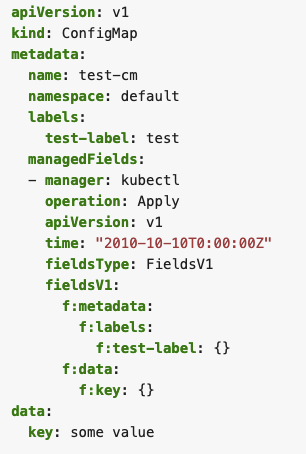
A simple example of an object created by Server-side Apply (SSA) could look like Fig. 1. The object contains a single manager in metadata.managedFields. The manager consists of basic information about the managing entity itself, like operation type, API version, and the fields managed by it. SSA uses a more declarative approach, which tracks a user's field management, rather than a user's last applied state. This means that as a side effect of using SSA, information about which field manager manages each field in an object also becomes available.

Fig 1. Server-side Apply Example

Server-side Apply use-cases in Google

Config Connector

Config Connector [3] leverages Server-side Apply to enable users to manage Google Cloud resources by both Config Connector and other configuration tools; e.g., gcloud, Cloud Console, or custom operators. Config Connector controllers use `managedFields` metadata to understand which fields are owned by Config Connector and which fields are managed outside the Kubernetes object [5]. Customers can have the flexibility of managing Google Cloud resources by both Config Connector and external tools; e.g., using a custom autoscaler for Bigtable clusters.

Config Sync

Config Sync [2] lets cluster operators and platform administrators deploy consistent configurations and policies, by continuously reconciling the state of clusters with Kubernetes configs stored in Git repositories. Config Sync leverages SSA to apply the configs to the clusters, and then monitors and remediates configuration drift using SSA.

KPT

KPT [4] is Git-native, schema-aware, extensible client-side tool for packaging, customizing, validating, and applying Kubernetes resources. KPT live apply leverages SSA to apply Kubernetes Resource Model (KRM) resources. It also uses SSA to preview the changes in KRM resources before applying them to the Kubernetes cluster.

What's Next?

After Server-side Apply, the next focus for the API Expression working-group is around improving the expressiveness and size of the published Kubernetes API schema. To see the full list of items we are working on, please join our working group and refer to the work items document.

How to get involved?

The working-group for apply is wg-api-expression. It is available on slack #wg-api-expression, through the mailing list.

References

[1] CPA: Config & Policy Automation: https://cloud.google.com/anthos/config-management
[2] Config Sync: https://cloud.google.com/anthos-config-management/docs/config-sync-overview
[3] Config Connector: https://cloud.google.com/config-connector/docs/overview
[4] KPT: https://opensource.google/projects/kpt
[5] Config Connector externally managed fields: https://cloud.google.com/config-connector/docs/concepts/managing-fields-externally


By Software Engineers- Antoine Pelisse, Joe Betz, Zeya Zhang, Janet Kuo, Kevin Delgado, Sunil Arora, and Engineering Manager, Leila Jalali


Four areas of open source contributions from Cloud Databases

Tuesday, October 26, 2021

Open Cloud enables you to develop software faster, innovate more easily, and scale more efficiently—while also reducing technology risk. Google has a long history of leadership in open source, and today, I want to look back at our activities around open source projects, for databases, over the past year.

Give developers the best tools to be efficient

Developers choose to build applications with managed database services on Google Cloud to benefit from velocity, scalability, security, and performance. To enable you to be most efficient and deliver your best possible work, we deliver tools and frameworks that work with your preferred development environments, no matter if you develop in the cloud or on premises. To make local testing, building and continuous integration easier for our cloud-native databases, we released emulators for Cloud Spanner, Firestore, and Cloud Bigtable so that you can test your code wherever you develop it - without the need to create or re-create cloud infrastructure with every test run.

Another area where we are helping developers is with instrumentation of Cloud SQL for easier debugging and performance tuning. With Cloud SQL Insights it is easier than ever to pinpoint underperforming SQL statements. That said, without additional instrumentation, it can be cumbersome to identify the source code or microservice that issued that SQL - let alone tying a SQL statement to a client session and its context. So we released Sqlcommenter as an open source library that will automatically add this instrumentation as SQL comments in queries that are generated by popular ORMs like Hibernate, Django, Sqlalchemy, and others (repo blog). We didn’t stop there, but merged Sqlcommenter with OpenTelemetry (blog) to add SQL insights from instrumented queries back to OpenTelemetry traces.

Lastly, we want to broaden access to our differentiated offerings, like Spanner. The recently announced Spanner PostgreSQL interface allows organizations to access Spanner’s industry-leading consistency and availability at scale using tools and skills from the popular PostgreSQL ecosystem. This new way of working with Spanner provides familiarity for developers and portability for administrators. (blog) Learn more in the documentation or sign up for the preview today.

Provide connectivity that is simple and secure

Connecting to APIs and databases from an application running in the cloud should be simple and secure. That’s why we recommend using IAM and Application Default Credentials when authenticating to other services. The Cloud SQL Proxy (repo) has been doing this and also setting up firewalls for you for a while. It works by running a local client either inside your VM or a GKE cluster. This year, we added libraries for Java (repo) and Python (repo) that can provide similar functionality without the overhead of running an extra client such as the proxy.

Cloud Spanner also offers an open source adapter for its new PostgreSQL interface (repo). This local proxy allows tools, starting with psql, to connect to a Spanner database using the PostgreSQL wire protocol.

Image 1: White pipes in datacenter

Manage cloud infrastructure with the tools of your choice

When it comes to provisioning, monitoring, and managing your cloud database services, flexibility and choice are important. We provide you with our cloud console, gcloud cli, and APIs as well as our own Deployment Manager. That said, you may prefer different ways to manage cloud infrastructure - whether through interactive tools or scripts or embedded into CI/CD pipelines that support GitOps or other controls, checks, and balances. Terraform is one of those open tools that is very popular - and we ensure that our cloud databases can be managed from it as documented in this blog about creating Spanner instances with Terraform.

If you manage the majority of your resources with Kubernetes either directly or through package managers like Helm, then our Kubernetes Config Connector (KCC) might be for you. In a nutshell, KCC exposes Google Cloud services such as Cloud SQL, Spanner, and others as Custom Resources in Kubernetes. This allows you to create and reconcile cloud resources outside of Kubernetes just like K8s native objects.

Once you are managing cloud infrastructure with CI/CD, the next step is to extend that same mechanism to manage objects within your databases such as tables, indexes, and views. To that extent we have released a Liquibase extension for Cloud Spanner.

Help you to move data with confidence

Cloud journeys often involve moving data either in a lift and shift process or sometimes replatforming to a different database. Whatever your journey, we want to simplify the process and give you the confidence that your migration is successful.

For enterprise users with Oracle databases, we have several open source projects. First, we have the Optimus Prime database assessment tool (repo) that queries your database and collects information about schemas and historic performance to be analyzed for migration complexity and consolidation potential. Our own professional services teams have been using this toolset to plan migrations to Bare Metal Solution for Oracle.

Some Oracle users are looking for opportunities to transform their workloads to fit with their bigger strategy of modernizing applications with Kubernetes. For this group we developed and open sourced the El Carro Kubernetes operator for Oracle. This not only automates database lifecycle tasks for systems running on Kubernetes, but also exposes declarative APIs for these operations.

If your application supports replatforming from Oracle to PostgreSQL, then we have a toolset for schema conversion along with dataflow pipelines that will read the output of a change data capture job and load it into a PostgreSQL database. What a great use-case for Datastream - our new serverless change data capture service.

Another case of heterogeneous database migration is to move MySQL or PostgreSQL databases to Cloud Spanner. HarbourBridge helps with the evaluation and data migration, and our latest contribution was adding support for DynamoDB as a source database. Part of every heterogeneous migration should be to validate that the source and target data are matching - we have released the Data Validation Toolkit for that use-case. DVT can connect to a number of source and target databases and compare the data on each side - giving you the confidence that your migration did not miss or change any records.

Conclusion

Whether you are migrating existing databases or you are building your next application in the cloud - we want to make your journey as comfortable and seamless as possible. Open source projects play a big role in meeting you where you are and providing you with the connectivity options, language support, and tools you want for management and migrations.

By Bjoern Rost, Product Manager, Google Cloud Databases

Protect your open source project from supply chain attacks

Tuesday, October 19, 2021

From executive orders to key signing parties, 2021 has been the year of supply chain security. If you’re an open source maintainer, learning about the attack surface of your project and the threat vectors throughout your project’s supply chain can feel overwhelming, maybe even insurmountable. The good news is that 2021 has also been the year of supply chain security solutions. While there’s still plenty of work to be done, and plenty of room for improvement in existing solutions, there are preventative controls you can apply to your project now to harden your supply chain and prevent compromise.

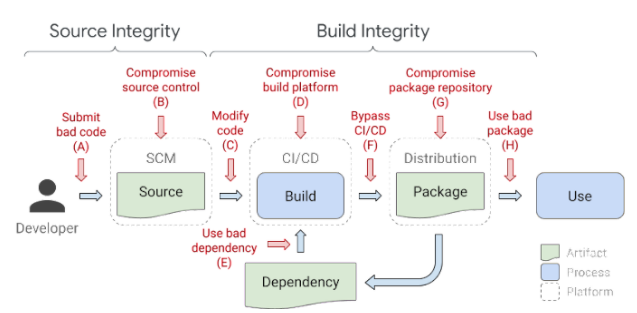
At All Things Open 2021, the audience learned about best practices for supply chain security through a quiz game. This blog post walks through the quiz questions, answers, and options for prevention, and can serve as a beginner's guide for anyone who wants to protect their open source project from supply chain attacks. These recommendations follow the SLSA framework and OpenSSF Scorecards rubric, and many can be implemented automatically by using the Allstar project.

An example of a typical software supply chain and examples of attacks that can occur at every link in the chain.

Q1: What should you do to protect your developer accounts from takeover?
  1. ANSWER: Use multi-factor auth (with a security key if possible)
  2. Use a shared account for core maintainers
  3. Make sure to write all your passwords in rot13
  4. Use an IP allowlist
Why and how: A malicious actor with access to a developer account can pretend to be a known contributor and submit bad code. Encourage contributors to use multi-factor authentication (MFA) not only for platforms where they send commits, but also for accounts associated with contributions, such as email. Where possible, security keys are the recommended form of MFA.

Q2: What should you do to avoid merging malicious commits?
  1. ANSWER: Require all commits to be reviewed by someone who is not the commit author
  2. Auto-run tests on all commits
  3. Scan for the word ‘bitcoin’ in all commits
  4. Only accept commits from contributors who have accounts older than 1 year
Why and how: Self-merging (also known as a unilateral change) introduces two risks: 1) An attacker who has compromised a contributor’s account can inject malicious code directly into the project, or 2) A well-intentioned person can merge a commit that accidentally introduces a security risk. A second set of authenticated eyes can help avoid malicious submissions and accidental weaknesses. Set this up as an automated requirement if possible (such as using GitHub’s Branch Protection settings); tools like Allstar can help enforce this requirement. This corresponds to SLSA level 4.

Q3: How can you protect secrets used by your CI/CD pipeline?
  1. ANSWER: Use a secret manager tool
  2. Appoint a maintainer to control secrets access
  3. Store secrets as environment variables
  4. Store secrets in a separate repo
Why and how: The “defense in depth” security concept is about applying multiple, different layers of defense to protect systems and sensitive data, such as secrets*. A secret manager tool (like Secret Manager for GCP users, HashiCorp Vault, CyberArk Conjur, or Keywhiz) removes the need for hard-coding secrets in source code, provides centralization and audit capabilities, and introduces an authorization layer to prevent leaking secrets.

*When storing sensitive data in a CI system, ensure it is truly for CI/CD purposes, and not data that is better suited for a password or identity manager.

Q4: What should you do to protect your CI/CD system from abuse?
  1. ANSWER: Use access controls following the principle of least privilege
  2. Run integration tests on all pull requests/commits
  3. Mark all contributors as “Collaborators” through GitHub roles
  4. Run CI/CD systems locally
Why and how: Defaulting to “the least amount of access necessary” for your project repository protects your CI/CD system from both unintended access and abuse. While running tests is important, running tests on all commits/pull requests by default—before they’ve been reviewed—can lead to unintentional and malicious abuse of your CI/CD system’s compute resources.

Q5: What should you do to avoid compromise during build time?
  1. ANSWER: Define build definitions and configurations as code, eg build.yaml
  2. Make your builds run as quickly as possible so attackers have no time to compromise your code
  3. Only use LEGO brand components in your build system, accept no substitutes
  4. Delete build logs to avoid leaving clues for attackers
Why and how: Using a build script—a file that defines the build and its steps, like build.yaml—removes the need to manually run build steps, which could possibly introduce an accidental misconfiguration. It also reduces the opportunity for a malicious actor to tamper with the build or insert unreviewed changes. This corresponds to SLSA levels 1-4.

Q6: How should you evaluate dependencies before use?
  1. ANSWER: Assess risk and transitive changes with tools like Scorecards and deps.dev
  2. Check for a little ‘lock’ icon next to the package url
  3. Only use dependencies that have a minimum of 1,000 GitHub stars
  4. Only use dependencies that have never changed maintainers
Why and how: There isn’t one definitive measure that can tell you a package is “good” or “bad;” every project has different security profiles and risk tolerances. Gathering information about a dependency, and what changes it might introduce transitively, will help you decide if a dependency is “safe” for your project. Tools like Open Source Insights (deps.dev) map first layer and transitive dependencies, while Scorecards gives packages a score for multiple risk assessment metrics, including use of security policies, MFA, and branch protection.

Once you determine what dependencies you’re using, running a vulnerability scanning tool such as Open Source Vulnerabilities regularly will help you stay up to date on the latest releases and patches. Many vulnerability scanning tools can also apply automatic upgrades.

Q7: What should you do to ensure your build is the build you think it is (aka verification)?
  1. ANSWER: Use a build service that can generate authenticated provenance
  2. Check the last commit to be sure it’s from a trusted committer
  3. Use steganography to embed your project logo into the build
  4. Run conformance tests for each release
Why and how: Showing the origin and artifacts of a build (the build’s provenance) demonstrates to the user that the build has not been tampered with, and is the correct build. There are many components to provenance; one method to deliver these components is to use a build service that generates and authenticates the data needed to show provenance. This corresponds to SLSA levels 2-4.

Q8: What should you look for when selecting artifacts from a registry?
  1. ANSWER: That artifacts have been cryptographically and verifiably signed
  2. That artifacts are not cursed (through being stolen from tombs)
  3. Timestamps: only use the most recent artifact created
  4. Official endorsement: look for the logo of a trusted brand or standards body
Why and how: Just as you should generate provenance and sign builds for your projects (SLSA levels 2-4), you should also look for the same verification when using artifacts from others. Logos and other brand-based forms of endorsement can be falsified and are used by typosquatters to fake legitimacy; look for tamper-proof verification like signatures. For example, Sigstore helps OSS projects sign their builds, and validate the builds of others.

Improving your project’s security is a continuous journey. Some of these recommendations may not be feasible for your project today, but every step you can take to increase your project’s security is a step in the right direction.

Resources for open source project security:
  • SLSA: A framework for levels of supply chain security
  • Scorecards: A measurement of security best practices use
  • Allstar: A GitHub app for enforcing security best practices
  • Open Source Insights: A searchable visualization of open source project dependencies
  • OSV: A vulnerability database and automation infrastructure for open source
By Anne Bertucio, Google Open Source Programs Office
.