opensource.google.com

Menu
Showing posts with label computer vision. Show all posts

AutoFlip: An Open Source Framework for Intelligent Video Reframing

Friday, February 14, 2020

Originally posted on the AI Blog

Videos filmed and edited for television and desktop are typically created and viewed in landscape aspect ratios (16:9 or 4:3). However, with an increasing number of users creating and consuming content on mobile devices, historical aspect ratios don’t always fit the display being used for viewing. Traditional approaches for reframing video to different aspect ratios usually involve static cropping, i.e., specifying a camera viewport, then cropping visual contents that are outside. Unfortunately, these static cropping approaches often lead to unsatisfactory results due to the variety of composition and camera motion styles. More bespoke approaches, however, typically require video curators to manually identify salient contents on each frame, track their transitions from frame-to-frame, and adjust crop regions accordingly throughout the video. This process is often tedious, time-consuming, and error-prone.

To address this problem, we are happy to announce AutoFlip, an open source framework for intelligent video reframing. AutoFlip is built on top of the MediaPipe framework that enables the development of pipelines for processing time-series multimodal data. Taking a video (casually shot or professionally edited) and a target dimension (landscape, square, portrait, etc.) as inputs, AutoFlip analyzes the video content, develops optimal tracking and cropping strategies, and produces an output video with the same duration in the desired aspect ratio.
Left: Original video (16:9). Middle: Reframed using a standard central crop (9:16). Right: Reframed with AutoFlip (9:16). By detecting the subjects of interest, AutoFlip is able to avoid cropping off important visual content.

AutoFlip Overview

AutoFlip provides a fully automatic solution to smart video reframing, making use of state-of-the-art ML-enabled object detection and tracking technologies to intelligently understand video content. AutoFlip detects changes in the composition that signify scene changes in order to isolate scenes for processing. Within each shot, video analysis is used to identify salient content before the scene is reframed by selecting a camera mode and path optimized for the contents.

Shot (Scene) Detection

A scene or shot is a continuous sequence of video without cuts (or jumps). To detect the occurrence of a shot change, AutoFlip computes the color histogram of each frame and compares this with prior frames. If the distribution of frame colors changes at a different rate than a sliding historical window, a shot change is signaled. AutoFlip buffers the video until the scene is complete before making reframing decisions, in order to optimize the reframing for the entire scene.

Video Content Analysis

We utilize deep learning-based object detection models to find interesting, salient content in the frame. This content typically includes people and animals, but other elements may be identified, depending on the application, including text overlays and logos for commercials, or motion and ball detection for sports.

The face and object detection models are integrated into AutoFlip through MediaPipe, which uses TensorFlow Lite on CPU. This structure allows AutoFlip to be extensible, so developers may conveniently add new detection algorithms for different use cases and video content. Each object type is associated with a weight value, which defines its relative importance — the higher the weight, the more influence the feature will have when computing the camera path.


Left: People detection on sports footage. Right: Two face boxes (‘core’ and ‘all’ face landmarks). In narrow portrait crop cases, often only the core landmark box can fit.

Reframing

After identifying the subjects of interest on each frame, logical decisions about how to reframe the content for a new view can be made. AutoFlip automatically chooses an optimal reframing strategy — stationary, panning or tracking — depending on the way objects behave during the scene (e.g., moving around or stationary). In stationary mode, the reframed camera viewport is fixed in a position where important content can be viewed throughout the majority of the scene. This mode can effectively mimic professional cinematography in which a camera is mounted on a stationary tripod or where post-processing stabilization is applied. In other cases, it is best to pan the camera, moving the viewport at a constant velocity. The tracking mode provides continuous and steady tracking of interesting objects as they move around within the frame.

Based on which of these three reframing strategies the algorithm selects, AutoFlip then determines an optimal cropping window for each frame, while best preserving the content of interest. While the bounding boxes track the objects of focus in the scene, they typically exhibit considerable jitter from frame-to-frame and, consequently, are not sufficient to define the cropping window. Instead, we adjust the viewport on each frame through the process of Euclidean-norm optimization, in which we minimize the residuals between a smooth (low-degree polynomial) camera path and the bounding boxes.

Top: Camera paths resulting from following the bounding boxes from frame-to-frame. Bottom: Final smoothed camera paths generated using Euclidean-norm path formation. Left: Scene in which objects are moving around, requiring a tracking camera path. Right: Scene where objects stay close to the same position; a stationary camera covers the content for the full duration of the scene.

AutoFlip’s configuration graph provides settings for either best-effort or required reframing. If it becomes infeasible to cover all the required regions (for example, when they are too spread out on the frame), the pipeline will automatically switch to a less aggressive strategy by applying a letterbox effect, padding the image to fill the frame. For cases where the background is detected as being a solid color, this color is used to create seamless padding; otherwise a blurred version of the original frame is used.

AutoFlip Use Cases

We are excited to release this tool directly to developers and filmmakers, reducing the barriers to their design creativity and reach through the automation of video editing. The ability to adapt any video format to various aspect ratios is becoming increasingly important as the diversity of devices for video content consumption continues to rapidly increase. Whether your use case is portrait to landscape, landscape to portrait, or even small adjustments like 4:3 to 16:9, AutoFlip provides a solution for intelligent, automated and adaptive video reframing.


What’s Next?

Like any machine learning algorithm, AutoFlip can benefit from an improved ability to detect objects relevant to the intent of the video, such as speaker detection for interviews or animated face detection on cartoons. Additionally, a common issue arises when input video has important overlays on the edges of the screen (such as text or logos) as they will often be cropped from the view. By combining text/logo detection and image inpainting technology, we hope that future versions of AutoFlip can reposition foreground objects to better fit the new aspect ratios. Lastly, in situations where padding is required, deep uncrop technology could provide improved ability to expand beyond the original viewable area.

While we work to improve AutoFlip internally at Google, we encourage contributions from developers and filmmakers in the open source communities.

Acknowledgments

We would like to thank our colleagues who contributed to Autoflip, Alexander Panagopoulos, Jenny Jin, Brian Mulford, Yuan Zhang, Alex Chen, Xue Yang, Mickey Wang, Justin Parra, Hartwig Adam, Jingbin Wang, and Weilong Yang; MediaPipe team who helped with open sourcing, Jiuqiang Tang, Tyler Mullen, Mogan Shieh, Ming Guang Yong, and Chuo-Ling Chang.

By Nathan Frey, Senior Software Engineer, Google Research, Los Angeles and Zheng Sun, Senior Software Engineer, Google Research, Mountain View

Video Architecture Search

Monday, October 21, 2019

Video understanding is a challenging problem. Because a video contains spatio-temporal data, its feature representation is required to abstract both appearance and motion information. This is not only essential for automated understanding of the semantic content of videos, such as web-video classification or sport activity recognition, but is also crucial for robot perception and learning. Just like humans, an input from a robot’s camera is seldom a static snapshot of the world, but takes the form of a continuous video.

The abilities of today’s deep learning models are greatly dependent on their neural architectures. Convolutional neural networks (CNNs) for videos are normally built by manually extending known 2D architectures such as Inception and ResNet to 3D or by carefully designing two-stream CNN architectures that fuse together both appearance and motion information. However, designing an optimal video architecture to best take advantage of spatio-temporal information in videos still remains an open problem. Although neural architecture search (e.g., Zoph et al, Real et al) to discover good architectures has been widely explored for images, machine-optimized neural architectures for videos have not yet been developed. Video CNNs are typically computation- and memory-intensive, and designing an approach to efficiently search for them while capturing their unique properties has been difficult.

In response to these challenges, we have conducted a series of studies into automatic searches for more optimal network architectures for video understanding. We showcase three different neural architecture evolution algorithms: learning layers and their module configuration (EvaNet); learning multi-stream connectivity (AssembleNet); and building computationally efficient and compact networks (TinyVideoNet). The video architectures we developed outperform existing hand-made models on multiple public datasets by a significant margin, and demonstrate a 10x~100x improvement in network runtime.

EvaNet: The First Evolved Video Architectures

EvaNet, which we introduce in “Evolving Space-Time Neural Architectures for Videos” at ICCV 2019, is the very first attempt to design neural architecture search for video architectures. EvaNet is a module-level architecture search that focuses on finding types of spatio-temporal convolutional layers as well as their optimal sequential or parallel configurations. An evolutionary algorithm with mutation operators is used for the search, iteratively updating a population of architectures. This allows for parallel and more efficient exploration of the search space, which is necessary for video architecture search to consider diverse spatio-temporal layers and their combinations. EvaNet evolves multiple modules (at different locations within the network) to generate different architectures.

Our experimental results confirm the benefits of such video CNN architectures obtained by evolving heterogeneous modules. The approach often finds that non-trivial modules composed of multiple parallel layers are most effective as they are faster and exhibit superior performance to hand-designed modules. Another interesting aspect is that we obtain a number of similarly well-performing, but diverse architectures as a result of the evolution, without extra computation. Forming an ensemble with them further improves performance. Due to their parallel nature, even an ensemble of models is computationally more efficient than the other standard video networks, such as (2+1)D ResNet. We have open sourced the code.


Examples of various EvaNet architectures. Each colored box (large or small) represents a layer with the color of the box indicating its type: 3D conv. (blue), (2+1)D conv. (orange), iTGM (green), max pooling (grey), averaging (purple), and 1x1 conv. (pink). Layers are often grouped to form modules (large boxes). Digits within each box indicate the filter size.

AssembleNet: Building Stronger and Better (Multi-stream) models

In “AssembleNet: Searching for Multi-Stream Neural Connectivity in Video Architectures”, we look into a new method of fusing different sub-networks with different input modalities (e.g., RGB and optical flow) and temporal resolutions. AssembleNet is a “family” of learnable architectures that provide a generic approach to learn the “connectivity” among feature representations across input modalities, while being optimized for the target task. We introduce a general formulation that allows representation of various forms of multi-stream CNNs as directed graphs, coupled with an efficient evolutionary algorithm to explore the high-level network connectivity. The objective is to learn better feature representations across appearance and motion visual clues in videos. Unlike previous hand-designed two-stream models that use late fusion or fixed intermediate fusion, AssembleNet evolves a population of overly-connected, multi-stream, multi-resolution architectures while guiding their mutations by connection weight learning. We are looking at four-stream architectures with various intermediate connections for the first time — 2 streams per RGB and optical flow, each one at different temporal resolutions.

The figure below shows an example of an AssembleNet architecture, found by evolving a pool of random initial multi-stream architectures over 50~150 rounds. We tested AssembleNet on two very popular video recognition datasets: Charades and Moments-in-Time (MiT). Its performance on MiT is the first above 34%. The performances on Charades is even more impressive at 58.6% mean Average Precision (mAP), whereas previous best known results are 42.5 and 45.2.


The representative AssembleNet model evolved using the Moments-in-Time dataset. A node corresponds to a block of spatio-temporal convolutional layers, and each edge specifies their connectivity. Darker edges mean stronger connections. AssembleNet is a family of learnable multi-stream architectures, optimized for the target task.


A figure comparing AssembleNet with state-of-the-art, hand-designed models on Charades (left) and Moments-in-Time (right) datasets. AssembleNet-50 or AssembleNet-101 has an equivalent number of parameters to a two-stream ResNet-50 or ResNet-101.

Tiny Video Networks: The fastest video understanding networks

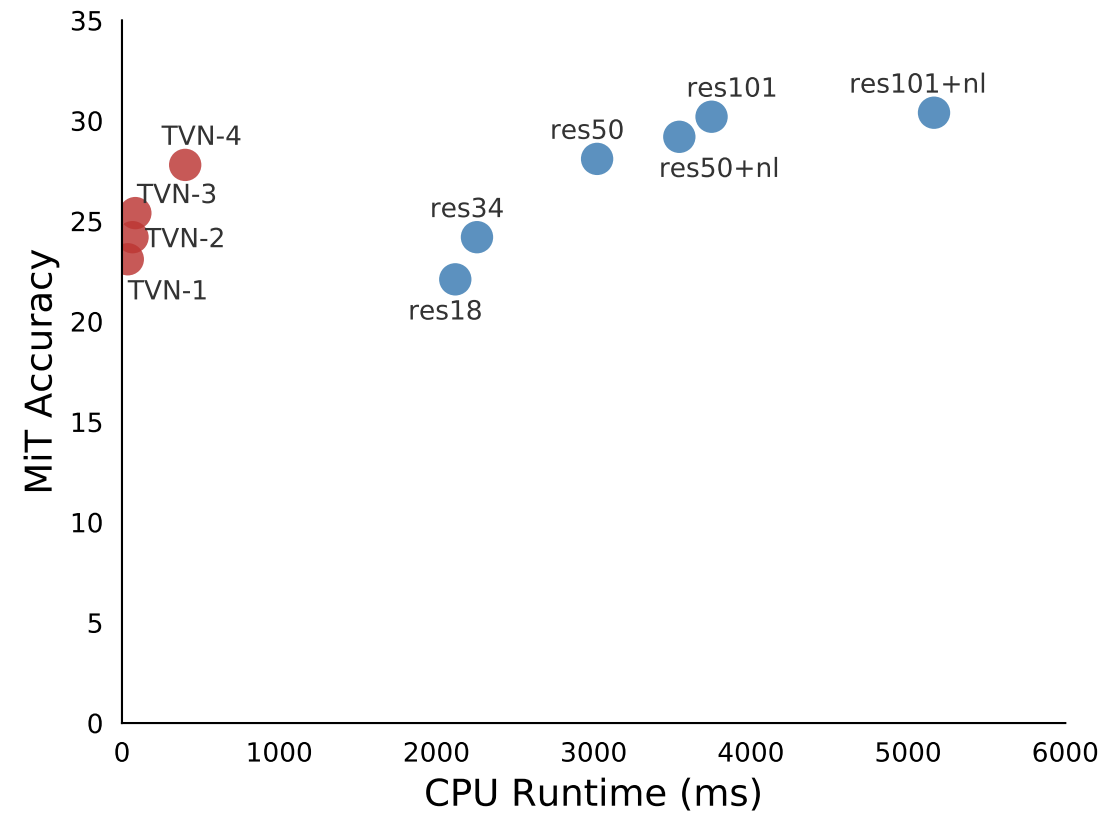
In order for a video CNN model to be useful for devices operating in a real-world environment, such as that needed by robots, real-time, efficient computation is necessary. However, achieving state-of-the-art results on video recognition tasks currently requires extremely large networks, often with tens to hundreds of convolutional layers, that are applied to many input frames. As a result, these networks often suffer from very slow runtimes, requiring at least 500+ ms per 1-second video snippet on a contemporary GPU and 2000+ ms on a CPU. In Tiny Video Networks, we address this by automatically designing networks that provide comparable performance at a fraction of the computational cost. Our Tiny Video Networks (TinyVideoNets) achieve competitive accuracy and run efficiently, at real-time or better speeds, within 37 to 100 ms on a CPU and 10 ms on a GPU per ~1 second video clip, achieving hundreds of times faster speeds than the other human-designed contemporary models.

These performance gains are achieved by explicitly considering the model run-time during the architecture evolution and forcing the algorithm to explore the search space while including spatial or temporal resolution and channel size to reduce computations. The below figure illustrates two simple, but very effective architectures, found by TinyVideoNet. Interestingly the learned model architectures have fewer convolutional layers than typical video architectures: Tiny Video Networks prefers lightweight elements, such as 2D pooling, gating layers, and squeeze-and-excitation layers. Further, TinyVideoNet is able to jointly optimize parameters and runtime to provide efficient networks that can be used by future network exploration.


TinyVideoNet (TVN) architectures evolved to maximize the recognition performance while keeping its computation time within the desired limit. For instance, TVN-1 (top) runs at 37 ms on a CPU and 10ms on a GPU. TVN-2 (bottom) runs at 65ms on a CPU and 13ms on a GPU.


CPU runtime of TinyVideoNet models compared to prior models (left) and runtime vs. model accuracy of TinyVideoNets compared to (2+1)D ResNet models (right). Note that TinyVideoNets take a part of this time-accuracy space where no other models exist, i.e., extremely fast but still accurate.

Conclusion

To our knowledge, this is the very first work on neural architecture search for video understanding. The video architectures we generate with our new evolutionary algorithms outperform the best known hand-designed CNN architectures on public datasets, by a significant margin. We also show that learning computationally efficient video models, TinyVideoNets, is possible with architecture evolution. This research opens new directions and demonstrates the promise of machine-evolved CNNs for video understanding.

Acknowledgements

This research was conducted by Michael S. Ryoo, AJ Piergiovanni, and Anelia Angelova. Alex Toshev and Mingxing Tan also contributed to this work. We thank Vincent Vanhoucke, Juhana Kangaspunta, Esteban Real, Ping Yu, Sarah Sirajuddin, and the Robotics at Google team for discussion and support.

Supercharge your Computer Vision models with the TensorFlow Object Detection API

Thursday, June 15, 2017

Crossposted on the Google Research Blog

At Google, we develop flexible state-of-the-art machine learning (ML) systems for computer vision that not only can be used to improve our products and services, but also spur progress in the research community. Creating accurate ML models capable of localizing and identifying multiple objects in a single image remains a core challenge in the field, and we invest a significant amount of time training and experimenting with these systems.
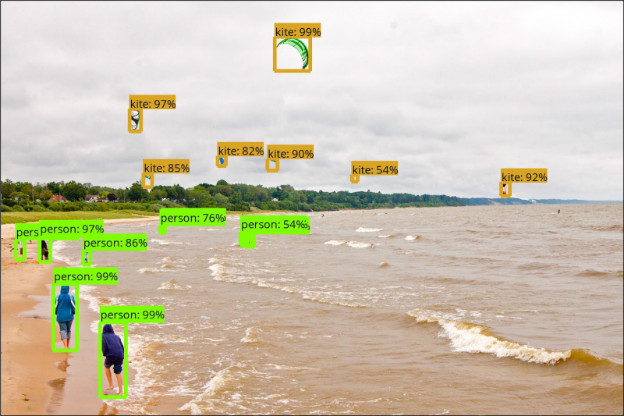
Detected objects in a sample image (from the COCO dataset) made by one of our models.
Image credit: Michael Miley, original image
Last October, our in-house object detection system achieved new state-of-the-art results, and placed first in the COCO detection challenge. Since then, this system has generated results for a number of research publications1,2,3,4,5,6,7 and has been put to work in Google products such as NestCam, the similar items and style ideas feature in Image Search and street number and name detection in Street View.

Today we are happy to make this system available to the broader research community via the TensorFlow Object Detection API. This codebase is an open source framework built on top of TensorFlow that makes it easy to construct, train and deploy object detection models.  Our goals in designing this system was to support state-of-the-art models while allowing for rapid exploration and research.  Our first release contains the following:
The SSD models that use MobileNet are lightweight, so that they can be comfortably run in real time on mobile devices. Our winning COCO submission in 2016 used an ensemble of the Faster RCNN models, which are are more computationally intensive but significantly more accurate.  For more details on the performance of these models, see our CVPR 2017 paper.

Are you ready to get started?
We’ve certainly found this code to be useful for our computer vision needs, and we hope that you will as well.  Contributions to the codebase are welcome and please stay tuned for our own further updates to the framework. To get started, download the code here and try detecting objects in some of your own images using the Jupyter notebook, or training your own pet detector on Cloud ML engine!

By Jonathan Huang, Research Scientist and Vivek Rathod, Software Engineer

Acknowledgements
The release of the Tensorflow Object Detection API and the pre-trained model zoo has been the result of widespread collaboration among Google researchers with feedback and testing from product groups. In particular we want to highlight the contributions of the following individuals:

Core Contributors: Derek Chow, Chen Sun, Menglong Zhu, Matthew Tang, Anoop Korattikara, Alireza Fathi, Ian Fischer, Zbigniew Wojna, Yang Song, Sergio Guadarrama, Jasper Uijlings, Viacheslav Kovalevskyi, Kevin Murphy

Also special thanks to: Andrew Howard, Rahul Sukthankar, Vittorio Ferrari, Tom Duerig, Chuck Rosenberg, Hartwig Adam, Jing Jing Long, Victor Gomes, George Papandreou, Tyler Zhu

References
  1. Speed/accuracy trade-offs for modern convolutional object detectors, Huang et al., CVPR 2017 (paper describing this framework)
  2. Towards Accurate Multi-person Pose Estimation in the Wild, Papandreou et al., CVPR 2017
  3. YouTube-BoundingBoxes: A Large High-Precision Human-Annotated Data Set for Object Detection in Video, Real et al., CVPR 2017 (see also our blog post)
  4. Beyond Skip Connections: Top-Down Modulation for Object Detection, Shrivastava et al., arXiv preprint arXiv:1612.06851, 2016
  5. Spatially Adaptive Computation Time for Residual Networks, Figurnov et al., CVPR 2017
  6. AVA: A Video Dataset of Spatio-temporally Localized Atomic Visual Actions, Gu et al., arXiv preprint arXiv:1705.08421, 2017
  7. MobileNets: Efficient convolutional neural networks for mobile vision applications, Howard et al., arXiv preprint arXiv:1704.04861, 2017

MobileNets: Open Source Models for Efficient On-Device Vision

Wednesday, June 14, 2017

Crossposted on the Google Research Blog

Deep learning has fueled tremendous progress in the field of computer vision in recent years, with neural networks repeatedly pushing the frontier of visual recognition technology. While many of those technologies such as object, landmark, logo and text recognition are provided for internet-connected devices through the Cloud Vision API, we believe that the ever-increasing computational power of mobile devices can enable the delivery of these technologies into the hands of our users, anytime, anywhere, regardless of internet connection. However, visual recognition for on device and embedded applications poses many challenges — models must run quickly with high accuracy in a resource-constrained environment making use of limited computation, power and space.

Today we are pleased to announce the release of MobileNets, a family of mobile-first computer vision models for TensorFlow, designed to effectively maximize accuracy while being mindful of the restricted resources for an on-device or embedded application. MobileNets are small, low-latency, low-power models parameterized to meet the resource constraints of a variety of use cases. They can be built upon for classification, detection, embeddings and segmentation similar to how other popular large scale models, such as Inception, are used.
Example use cases include detection, fine-grain classification, attributes and geo-localization.
This release contains the model definition for MobileNets in TensorFlow using TF-Slim, as well as 16 pre-trained ImageNet classification checkpoints for use in mobile projects of all sizes. The models can be run efficiently on mobile devices with TensorFlow Mobile.
Model Checkpoint
Million MACs
Million Parameters
Top-1 Accuracy
Top-5 Accuracy
569
4.24
70.7
89.5
418
4.24
69.3
88.9
291
4.24
67.2
87.5
186
4.24
64.1
85.3
317
2.59
68.4
88.2
233
2.59
67.4
87.3
162
2.59
65.2
86.1
104
2.59
61.8
83.6
150
1.34
64.0
85.4
110
1.34
62.1
84.0
77
1.34
59.9
82.5
49
1.34
56.2
79.6
41
0.47
50.6
75.0
34
0.47
49.0
73.6
21
0.47
46.0
70.7
14
0.47
41.3
66.2
Choose the right MobileNet model to fit your latency and size budget. The size of the network in memory and on disk is proportional to the number of parameters. The latency and power usage of the network scales with the number of Multiply-Accumulates (MACs) which measures the number of fused Multiplication and Addition operations. Top-1 and Top-5 accuracies are measured on the ILSVRC dataset.
We are excited to share MobileNets with the open source community. Information for getting started can be found at the TensorFlow-Slim Image Classification Library. To learn how to run models on-device please go to TensorFlow Mobile. You can read more about the technical details of MobileNets in our paper, MobileNets: Efficient Convolutional Neural Networks for Mobile Vision Applications.

By Andrew G. Howard, Senior Software Engineer and Menglong Zhu, Software Engineer

Acknowledgements
MobileNets were made possible with the hard work of many engineers and researchers throughout Google. Specifically we would like to thank:

Core Contributors: Andrew G. Howard, Menglong Zhu, Bo Chen, Dmitry Kalenichenko, Weijun Wang, Tobias Weyand, Marco Andreetto, Hartwig Adam

Special thanks to: Benoit Jacob, Skirmantas Kligys, George Papandreou, Liang-Chieh Chen, Derek Chow, Sergio Guadarrama, Jonathan Huang, Andre Hentz, Pete Warden

Google Summer of Code 2016 wrap-up: CloudCV

Monday, February 6, 2017

This guest post is part of our ongoing series of posts from the students, mentors and organization administrators who participated in Google Summer of Code (GSoC), a program which gets university students contributing to open source software.

Google Summer of Code 2016 was a memorable one for CloudCV. Despite being a relatively “young” organization (this is just our second year as a mentor organization), there were many excellent applicants who put a tremendous amount of effort into their proposals and ramp-up tasks. It was difficult to choose!

CloudCV began in the summer of 2014 as a research project within the Machine Learning and Perception Lab at Virginia Tech, with the ambitious goal of democratizing computer vision and machine learning. We’re run exclusively by students and are working to enable developers, researchers, and fellow students to leverage artificial intelligence technology as a service and to share state of the art algorithms with the research community.

In line with this goal, we decided to build two tools that cater to computer vision researchers and hobbyists alike: CloudCV-fy your code and CloudCV-IDE. Though building two new platforms from the ground up was going to be challenging, our students’ motivation was overwhelming and their performance surpassed all expectations. We even demonstrated their work at CVPR 2016, a top-tier computer vision conference!

CloudCV-fy

A recurring use case for computer vision researchers, and many others, is to build a web-based demo and REST API to demonstrate the capabilities of their creations to the world. But web development involves writing hundred of lines of additional code across multiple languages (HTML, CSS, JavaScript, etc), which takes time away from research.


Our first student, Ashish Chaudhary, took on this problem by building CloudCV-fy. Over many iterations of design and development, Ashish delivered a tool that allows a user to simply write lightweight wrappers around their machine learning model/library and be done. CloudCV-fy automatically builds web-based interactive demos for them -- no need to tinker with HTML, CSS or JavaScript. Code to demo. Done.

The demo can be hosted on our servers, the user’s own server or any third party cloud service. As a result of this, researchers can focus on what they do best: designing and training models. CloudCV handles the rest. You can learn more in the write-up Ashish did on his blog.

CloudCV-IDE

There has been an explosion in the number of deep learning frameworks and it is difficult for researchers to keep up with all the latest tools. CloudCV-IDE, built by student Gaurav Gupta, addresses this by allowing a user to build a deep learning network with a drag-and-drop interface, then export to the deep learning framework of their choice (Caffe, TensorFlow, etc).

Gaurav also added support to import model configuration files in order to visualize any architecture. This is one of the first attempts to do this.


By the end of the summer, Gaurav delivered a great UI to visualize models with robust support for Caffe and TensorFlow back-ends. This was a successful start that we plan to build on by supporting more frameworks and facilitating collaborative building of deep learning models.

Overall, this was a highly productive GSoC for CloudCV. Our tools are under active development and we welcome contributions and ideas for new features.

We will definitely apply for GSoC 2017. If you are a student interested in participating we encourage you to get involved early! Feel free to reach out to us on our Gitter channel or on our mailing list.

By Viraj Prabhu, Organization Administrator for CloudCV

Introducing the Open Images Dataset

Monday, October 3, 2016

Originally posted on the Google Research Blog

In the last few years, advances in machine learning have enabled Computer Vision to progress rapidly, allowing for systems that can automatically caption images to apps that can create natural language replies in response to shared photos. Much of this progress can be attributed to publicly available image datasets, such as ImageNet and COCO for supervised learning, and YFCC100M for unsupervised learning.

Today, we introduce Open Images, a dataset consisting of ~9 million URLs to images that have been annotated with labels spanning over 6000 categories. We tried to make the dataset as practical as possible: the labels cover more real-life entities than the 1000 ImageNet classes, there are enough images to train a deep neural network from scratch and the images are listed as having a Creative Commons Attribution license*.

The image-level annotations have been populated automatically with a vision model similar to Google Cloud Vision API. For the validation set, we had human raters verify these automated labels to find and remove false positives. On average, each image has about 8 labels assigned. Here are some examples:
Annotated images form the Open Images dataset. Left: Ghost Arches by Kevin Krejci. Right: Some Silverware by J B. Both images used under CC BY 2.0 license
We have trained an Inception v3 model based on Open Images annotations alone, and the model is good enough to be used for fine-tuning applications as well as for other things, like DeepDream or artistic style transfer which require a well developed hierarchy of filters. We hope to improve the quality of the annotations in Open Images the coming months, and therefore the quality of models which can be trained.

The dataset is a product of a collaboration between Google, CMU and Cornell universities, and there are a number of research papers built on top of the Open Images dataset in the works. It is our hope that datasets like Open Images and the recently released YouTube-8M will be useful tools for the machine learning community.

By Ivan Krasin and Tom Duerig, Software Engineers

* While we tried to identify images that are licensed under a Creative Commons Attribution license, we make no representations or warranties regarding the license status of each image and you should verify the license for each image yourself.
.