opensource.google.com

Menu
Showing posts with label Kotlin. Show all posts

TestParameterInjector introduces an idiomatic Kotlin API

Monday, May 25, 2026

In March 2021, we announced the open source release of TestParameterInjector: a simple but powerful parameterized test runner for JUnit4. In September 2022, we followed up with JUnit5 support, bringing our framework to developers who had moved on to the Jupiter API.

We're excited to announce our biggest update yet for our Kotlin users: KotlinTestParameters.

The de facto standard for parameterized testing

When we first introduced TestParameterInjector, we shared a graph showing its rapid adoption within Google. Over the past few years, that trajectory has continued to a point where TestParameterInjector is the de facto parameterized test framework.

Graph of the different parameterized test frameworks in Google

Usage of all other alternative frameworks continues to steadily decline, while TestParameterInjector's adoption keeps growing rapidly. It has fundamentally lowered the barrier to writing data-driven unit tests, empowering Googlers and open source developers alike to maximize test coverage with minimal boilerplate. We believe its ubiquity internally is a strong testament to its reliability and utility for the broader developer communities.

The Kotlin challenge

As Kotlin's popularity has surged, developers have naturally been writing more of their TestParameterInjector tests in Kotlin. However, specifying explicit test values in Kotlin historically meant falling back to Java-centric paradigms.

If you wanted to provide specific values to a test, you typically had three options, none of which felt truly idiomatic in Kotlin:

  1. @TestParameter({"123", "456"}): This relies on string arrays, limiting you to a subset of types that the string parsing supports.
  2. @TestParameters: This allows for more complex sets of data, but relies on YAML strings (e.g.,"{age: 17, expectIsAdult: false}"). These strings however are not type-safe, and are completely ignored by IDE refactoring tools.
  3. Provider classes: For complex types that couldn't be easily represented in strings, you have to write Provider classes, adding a bit of boilerplate code and indirection.

Enter KotlinTestParameters

To bring a seamless experience to Kotlin, we are introducing a significant new Kotlin-only feature: KotlinTestParameters.

By leveraging Kotlin's default function arguments, you can now define parameterized tests in a fully type-safe, concise, and refactor-friendly way using the testValues() function (and friends).

Here is what it looks like in practice:

import com.google.testing.junit.testparameterinjector.TestParameterInjector
import com.google.testing.junit.testparameterinjector.TestParameter
import com.google.testing.junit.testparameterinjector.KotlinTestParameters.testValues
import com.google.testing.junit.testparameterinjector.KotlinTestParameters.namedTestValues
import org.junit.Test
import org.junit.runner.RunWith

@RunWith(TestParameterInjector::class)
class MyTest {

  // Testing simple types directly
  @Test
  fun simpleTest(@TestParameter limit: Int = testValues(20, 100)) {
    // This test method is run twice: once for limit=20 and once for limit=100
  }

  // Testing complex types without YAML strings or Provider classes!
  data class TestCase(val age: Int, val expectIsAdult: Boolean)

  @Test
  fun complexTest(
    @TestParameter testCase: TestCase = namedTestValues(
      "teenager" to TestCase(age = 17, expectIsAdult = false),
      "young adult" to TestCase(age = 22, expectIsAdult = true)
    )
  ) {
    // This test method is run twice with fully typed data class instances
  }
}

Why we recommend making the switch

Because testValues() seamlessly integrates with Kotlin's language features, any type is supported. This completely eliminates the need for stringly-typed YAML maps or verbose Provider classes.

We firmly believe that KotlinTestParameters is a massive leap forward in readability and maintainability. Moving forward, this should be the default way of specifying test values for all new Kotlin tests, replacing the older @TestParameters, @TestParameter({"..."}), and Provider class patterns.

Try it out!

You can read more and start using KotlinTestParameters today over on our GitHub repository.

Let us know what you think on GitHub if you have any questions, comments, or feature requests!

Introducing Kotlin FHIR: A new library to bring FHIR to Multiplatform

Tuesday, September 16, 2025

Build once, deploy everywhere: multiplatform FHIR development on Android, iOS, and Web

by Jing Tang, Google Research

The mission of Google's Open Health Stack team is to accelerate digital health innovation by providing developers everywhere with critical building blocks for next-generation healthcare applications. Expanding its existing components, the team has released Kotlin FHIR (currently in alpha), a new open-source library now available on GitHub. It implements the HL7® FHIR® data model on Kotlin Multiplatform (KMP), enabling developers to build FHIR apps and tools for Android, iOS, and Web simultaneously.

Demo app launched as Android, iOS, and Web applications

Tools to support health data exchange using a modern standard

HL7® FHIR® (Fast Healthcare Interoperability Resources) is a global interoperability standard for healthcare data exchange. It enables healthcare systems to exchange data freely and securely, improving efficiency and transparency while reducing integration costs. Over the years, it has seen rapidly growing adoption, and its use has been mandated by health regulations in an increasing number of countries.

Since March 2023, the Open Health Stack team at Google has introduced a number of tools to support FHIR development. For example, the Android FHIR SDK helps developers to build offline capable FHIR-native apps that can help community health workers carry out data collection tasks in remote communities. With FHIR Data Pipes, developers can build analytics solutions more easily to generate critical insights for large healthcare programmes more easily. Today, apps powered by these tools are used by health workers covering over 75 million people across Sub-Saharan Africa, South and Southeast Asia.

A leap forward to multiplatform development

In low-resource settings, it is imperative to develop apps that can reach as many patients as possible at a low development cost. However, a lack of infrastructure and tooling often hinders this goal. For example, Kotlin Multiplatform (KMP) is a new and exciting technology rapidly gaining traction, but existing FHIR libraries are not suitable for KMP development due to their platform-specific dependencies. Consequently, developing FHIR apps on KMP has not been possible, causing developers to miss out on a significant opportunity to scale their solutions.

Introducing Kotlin FHIR. It is a modern and lightweight implementation of FHIR data models designed for use on KMP with no platform-specific dependencies. With Kotlin FHIR, developers can build FHIR apps once, and deploy them to Android, iOS, Web, and other platforms.

"Any library that helps implementers use FHIR is my favourite, but I'm particularly thrilled to see a new library from the awesome Open Health Stack team.

– Grahame Grieve, Creator of FHIR, Product Director at HL7

Modern, lightweight, and sustainable

Kotlin FHIR uses KotlinPoet to generate the FHIR data model directly from the specification. This ensures that the library is complete and maintainable. The data model classes it generates are minimalist to provide the best usability for developers: it has everything that you need, nothing less and nothing more. It uses modern language features in Kotlin such as sealed interfaces to ensure type-safety and to give developers the best coding experience. It supports all the FHIR versions: R4, R4B and R5, and will be updated when new FHIR versions are released.

The library is currently in alpha, but has received positive feedback from the developer community. To try FHIR multiplatform development using the library, head to the repository.

Beyond data models: more on multiplatform

Our mission is to empower the digital health community, and the Kotlin FHIR library is our latest step in that effort. But handling the FHIR data model on KMP is just the beginning. Rich features provided by the Android FHIR SDK libraries will also be needed on KMP. This is a collaborative effort, and we invite the FHIR community to join us in defining and building the cross-platform tools you need most. To learn more about how you can get involved, head to the Open Health Stack developer site.

Truth 1.0: Fluent Assertions for Java and Android Tests

Monday, July 8, 2019

Software testing is important—and sometimes frustrating. The frustration can come from working on innately hard domains, like concurrency, but too often it comes from a thousand small cuts:
assertEquals("Message has been sent", getString(notification, EXTRA_BIG_TEXT));
assertTrue(
    getString(notification, EXTRA_TEXT)
        .contains("Kurt Kluever <kak@google.com>"));
The two assertions above test almost the same thing, but they are structured differently. The difference in structure makes it hard to identify the difference in what's being tested.
A better way to structure these assertions is to use a fluent API:
assertThat(getString(notification, EXTRA_BIG_TEXT))
    .isEqualTo("Message has been sent");
assertThat(getString(notification, EXTRA_TEXT))
    .contains("Kurt Kluever <kak@google.com>");
A fluent API naturally leads to other advantages:
  • IDE autocompletion can suggest assertions that fit the value under test, including rich operations like containsExactly(permission.SEND_SMS, permission.READ_SMS).
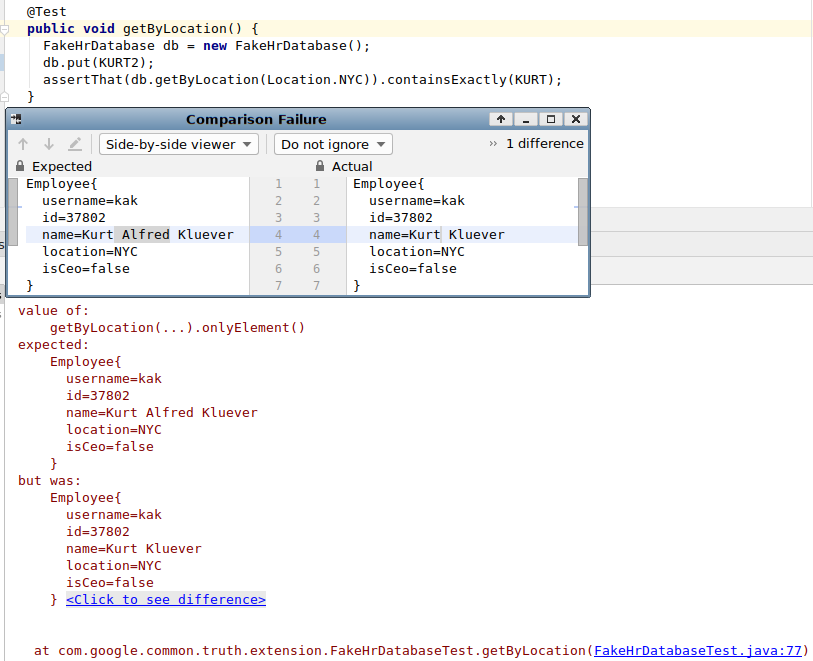
  • Failure messages can include the value under test and the expected result. Contrast this with the assertTrue call above, which lacks a failure message entirely.
Google's fluent assertion library for Java and Android is Truth. We're happy to announce that we've released Truth 1.0, which stabilizes our API after years of fine-tuning.


Truth started in 2011 as a Googler's personal open source project. Later, it was donated back to Google and cultivated by the Java Core Libraries team, the people who bring you Guava.
You might already be familiar with assertion libraries like Hamcrest and AssertJ, which provide similar features. We've designed Truth to have a simpler API and more readable failure messages. For example, here's a failure message from AssertJ:
java.lang.AssertionError:
Expecting:
  <[year: 2019
month: 7
day: 15
]>
to contain exactly in any order:
  <[year: 2019
month: 6
day: 30
]>
elements not found:
  <[year: 2019
month: 6
day: 30
]>
and elements not expected:
  <[year: 2019
month: 7
day: 15
]>
And here's the equivalent message from Truth:
value of:
    iterable.onlyElement()
expected:
    year: 2019
    month: 6
    day: 30

but was:
    year: 2019
    month: 7
    day: 15
For more details, read our comparison of the libraries, and try Truth for yourself.

Also, if you're developing for Android, try AndroidX Test. It includes Truth extensions that make assertions even easier to write and failure messages even clearer:
assertThat(notification).extras().string(EXTRA_BIG_TEXT)
    .isEqualTo("Message has been sent");
assertThat(notification).extras().string(EXTRA_TEXT)
    .contains("Kurt Kluever <kak@google.com>");
Coming soon: Kotlin users of Truth can look forward to Kotlin-specific enhancements.
By Chris Povirk, Java Core Libraries
.