opensource.google.com

Menu
Showing posts with label junit4. Show all posts

TestParameterInjector introduces an idiomatic Kotlin API

Monday, May 25, 2026

In March 2021, we announced the open source release of TestParameterInjector: a simple but powerful parameterized test runner for JUnit4. In September 2022, we followed up with JUnit5 support, bringing our framework to developers who had moved on to the Jupiter API.

We're excited to announce our biggest update yet for our Kotlin users: KotlinTestParameters.

The de facto standard for parameterized testing

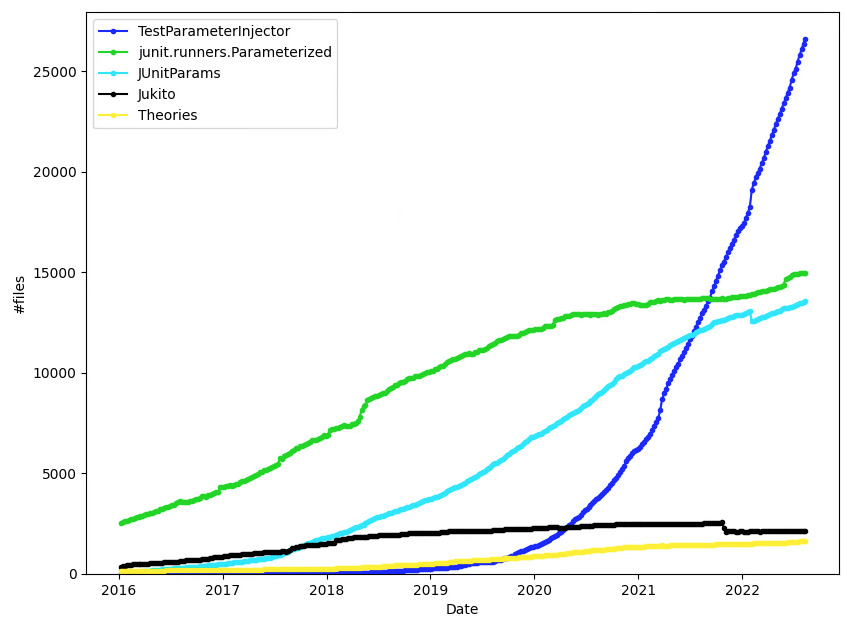
When we first introduced TestParameterInjector, we shared a graph showing its rapid adoption within Google. Over the past few years, that trajectory has continued to a point where TestParameterInjector is the de facto parameterized test framework.

Graph of the different parameterized test frameworks in Google

Usage of all other alternative frameworks continues to steadily decline, while TestParameterInjector's adoption keeps growing rapidly. It has fundamentally lowered the barrier to writing data-driven unit tests, empowering Googlers and open source developers alike to maximize test coverage with minimal boilerplate. We believe its ubiquity internally is a strong testament to its reliability and utility for the broader developer communities.

The Kotlin challenge

As Kotlin's popularity has surged, developers have naturally been writing more of their TestParameterInjector tests in Kotlin. However, specifying explicit test values in Kotlin historically meant falling back to Java-centric paradigms.

If you wanted to provide specific values to a test, you typically had three options, none of which felt truly idiomatic in Kotlin:

  1. @TestParameter({"123", "456"}): This relies on string arrays, limiting you to a subset of types that the string parsing supports.
  2. @TestParameters: This allows for more complex sets of data, but relies on YAML strings (e.g.,"{age: 17, expectIsAdult: false}"). These strings however are not type-safe, and are completely ignored by IDE refactoring tools.
  3. Provider classes: For complex types that couldn't be easily represented in strings, you have to write Provider classes, adding a bit of boilerplate code and indirection.

Enter KotlinTestParameters

To bring a seamless experience to Kotlin, we are introducing a significant new Kotlin-only feature: KotlinTestParameters.

By leveraging Kotlin's default function arguments, you can now define parameterized tests in a fully type-safe, concise, and refactor-friendly way using the testValues() function (and friends).

Here is what it looks like in practice:

import com.google.testing.junit.testparameterinjector.TestParameterInjector
import com.google.testing.junit.testparameterinjector.TestParameter
import com.google.testing.junit.testparameterinjector.KotlinTestParameters.testValues
import com.google.testing.junit.testparameterinjector.KotlinTestParameters.namedTestValues
import org.junit.Test
import org.junit.runner.RunWith

@RunWith(TestParameterInjector::class)
class MyTest {

  // Testing simple types directly
  @Test
  fun simpleTest(@TestParameter limit: Int = testValues(20, 100)) {
    // This test method is run twice: once for limit=20 and once for limit=100
  }

  // Testing complex types without YAML strings or Provider classes!
  data class TestCase(val age: Int, val expectIsAdult: Boolean)

  @Test
  fun complexTest(
    @TestParameter testCase: TestCase = namedTestValues(
      "teenager" to TestCase(age = 17, expectIsAdult = false),
      "young adult" to TestCase(age = 22, expectIsAdult = true)
    )
  ) {
    // This test method is run twice with fully typed data class instances
  }
}

Why we recommend making the switch

Because testValues() seamlessly integrates with Kotlin's language features, any type is supported. This completely eliminates the need for stringly-typed YAML maps or verbose Provider classes.

We firmly believe that KotlinTestParameters is a massive leap forward in readability and maintainability. Moving forward, this should be the default way of specifying test values for all new Kotlin tests, replacing the older @TestParameters, @TestParameter({"..."}), and Provider class patterns.

Try it out!

You can read more and start using KotlinTestParameters today over on our GitHub repository.

Let us know what you think on GitHub if you have any questions, comments, or feature requests!
TestParameterInjector gets JUnit5 support

Wednesday, September 7, 2022

In March 2021, we announced the open source release of TestParameterInjector: A parameterized test runner for JUnit4 (see GitHub page).

Over a year later, the Google-internal usage of TestParameterInjector has continued to rapidly grow, and is now by far the most popular parameterized test framework.
Graph of the different parameterized test frameworks in Google
Guava's philosophy frames it nicely: "When trying to estimate the ubiquity of a feature, we frequently use the Google internal code base as a reference." We also believe that TestParameterInjector usage in Google is a decent proxy for its utility elsewhere.

As you can see on the graph above, not only did TestParameterInjector reduce the usage of the other frameworks, but it also caused a drastic increase of the total amount of parameterized tests. This suggests that TestParameterInjector reduced the threshold for parameterizing a regular unit test and Googlers are more actively using this tool to improve the quality of their tests.

JUnit5 (Jupiter) support

At Google, we use JUnit4 exclusively, but some developers outside of Google have moved on to JUnit5 (Jupiter). For those users, we have now expanded the scope of TestParameterInjector.

We've kept the API the same as much as possible:

// **************** JUnit4 **************** //

@RunWith(TestParameterInjector.class)

public class MyTest {


  @TestParameter boolean isDryRun;


  @Test public void test1(@TestParameter boolean enableFlag) { ... }


  @Test public void test2(@TestParameter MyEnum myEnum) { ... }


  enum MyEnum { VALUE_A, VALUE_B, VALUE_C }

}


// **************** JUnit5 (Jupiter) **************** //

class MyTest {


  @TestParameter boolean isDryRun;


  @TestParameterInjectorTest

  void test1(@TestParameter boolean enableFlag) {

    // This method is run 4 times for all combinations of isDryRun and enableFlag

  }


  @TestParameterInjectorTest

  void test2(@TestParameter MyEnum myEnum) {

    // This method is run 6 times for all combinations of isDryRun and myEnum

  }


  enum MyEnum { VALUE_A, VALUE_B, VALUE_C }

}

The only differences are that @RunWith / @ExtendWith are not necessary and that every test method needs a @TestParameterInjectorTest annotation.

The other features of TestParameterInjector work in a similar way with Jupiter:

class MyTest {


  // **************** Defining sets of parameters **************** //

  @TestParameterInjectorTest

  @TestParameters(customName = "teenager", value = "{age: 17, expectIsAdult: false}")

  @TestParameters(customName = "young adult", value = "{age: 22, expectIsAdult: true}")

  void personIsAdult_success(int age, boolean expectIsAdult) {

    assertThat(personIsAdult(age)).isEqualTo(expectIsAdult);

  }


  // **************** Dynamic parameter generation **************** //

  @TestParameterInjectorTest

  void matchesAllOf_throwsOnNull(

      @TestParameter(valuesProvider = CharMatcherProvider.class) CharMatcher charMatcher) {

    assertThrows(NullPointerException.class, () -> charMatcher.matchesAllOf(null));

  }


  private static final class CharMatcherProvider implements TestParameterValuesProvider {

    @Override

    public List<CharMatcher> provideValues() {

      return ImmutableList.of(

          CharMatcher.any(), CharMatcher.ascii(), CharMatcher.whitespace());

    }

  }

}

Other things we've been working on

Custom names for @TestParameters
When running the following parameterized test:

@Test

@TestParameters("{age: 17, expectIsAdult: false}")

@TestParameters("{age: 22, expectIsAdult: true}")

public void withRepeatedAnnotation(int age, boolean expectIsAdult){ ... }

the generated test names will be:

MyTest#withRepeatedAnnotation[{age: 17, expectIsAdult: false}]

MyTest#withRepeatedAnnotation[{age: 22, expectIsAdult: true}]

This is fine for small parameter sets, but when the number of @TestParameters or parameters within the YAML string gets large, it quickly becomes hard to figure out what each parameter set is supposed to represent.

For those cases, we added the option to add customName:

@Test

@TestParameters(customName = "teenager", value = "{age: 17, expectIsAdult: false}")

@TestParameters(customName = "young adult", value = "{age: 22, expectIsAdult: true}")

public void personIsAdult(int age, boolean expectIsAdult){...}

To allow this API change, we had to allow @TestParameters to be used in a different way: The original way of specifying @TestParameters sets was to specify them as a list of YAML strings inside a single @TestParameters annotation. We considered multiple options of specifying the custom name inside of these YAML strings, such as a magic 
_name key and an extra YAML mapping layer where the keys would be the test names. But we eventually settled on the aforementioned API, which makes @TestParameters a repeated annotation because it results in the least complex code and clearly separates the different parameter sets.

It should be noted that the original API (list of YAML strings in single annotation) still works, but it is now discouraged in favor of multiple @TestParameters annotations with a single YAML string, even when customName isn't used. The main arguments for this recommendation are:
  • Consistency with the customName case, which needs a single YAML string per @TestParameters annotation
  • We believe it structures the list of parameters (especially when it's long) in a more structured way

Integration with RobolectricTestRunner

Recently, we've managed to internally make a version of RobolectricTestRunner that supports TestParameterInjector annotations. There is a significant amount of work left to open source this, and we are now considering when and how to do this.

Learn more

Our GitHub README provides an overview of the framework. Let us know on GitHub if you have any questions, comments, or feature requests!

By Jens Nyman – TestParameterInjector

Introducing TestParameterInjector: A JUnit4 parameterized test runner

Tuesday, March 30, 2021

 When writing unit tests, you may want to run the same or a very similar test for different inputs or input/output pairs. In Java, as in most programming languages, the best way to do this is by using a parameterized test framework.

JUnit4 has a number of such frameworks available, such as junit.runners.Parameterized and JUnitParams. A couple of years ago, a few Google engineers found the existing frameworks lacking in functionality and simplicity, and decided to create their own alternative. After a lot of tweaks, fixes, and feature additions based on feedback from clients all over Google, we arrived at what TestParameterInjector is today.

As can be seen in the graph below, TestParameterInjector is now the most used framework for new tests in the Google codebase:

Graph of the different parameterized test frameworks in Google

How does TestParameterInjector work?

The TestParameterInjector exposes two annotations: @TestParameter and @TestParameters. The following code snippet shows how the former works:


@RunWith(TestParameterInjector.class)

public class MyTest {


  @TestParameter boolean isDryRun;


  @Test public void test1(@TestParameter boolean enableFlag) {

    // This method is run 4 times for all combinations of isDryRun and enableFlag

  }


  @Test public void test2(@TestParameter MyEnum myEnum) {

    // This method is run 6 times for all combinations of isDryRun and myEnum

  }


  enum MyEnum { VALUE_A, VALUE_B, VALUE_C }

}


Annotated fields (such as isDryRun) will cause each test method to run for all possible values while annotated method parameters (such as enableFlag) will only impact that test method. Note that the generated test names will typically be helpful but concise, for example: MyTest#test2[isDryRun=true, VALUE_A].

The other annotation, @TestParameters, can be seen at work in this snippet:

@RunWith(TestParameterInjector.class)

public class MyTest {


  @Test

  @TestParameters({

    "{age: 17, expectIsAdult: false}",

    "{age: 22, expectIsAdult: true}",

  })

  public void personIsAdult(int age, boolean expectIsAdult) {

    // This method is run 2 times

  }

}


In contrast to the first example, which tests all combinations, a @TestParameters-annotated method runs once for each test case specified.

How does TestParameterInjector compare to other frameworks?

To our knowledge, the table below summarizes the features of the different frameworks in use at Google:

TestParameterInjector

junit.runners. Parameterized

JUnitParams

Burst

DataProvider

Jukito

Theories

Documentation

GitHub

GitHub

GitHub

GitHub

GitHub

GitHub

junit.org

Supports field injection


Supports parameter injection


Considers sets of parameters correlated or orthogonal

both are supported

correlated

correlated

orthogonal

correlated

orthogon

al

orthogonal

Refactor friendly

(✓)


Learn more

Our GitHub README at https://github.com/google/TestParameterInjector gives an overview of the possibilities of this framework. Let us know on GitHub if you have any questions, comments, or feature requests!

By Jens Nyman, TestParameterInjector team

1Parameters are considered dependent. You specify explicit combinations to be run.
2Parameters are considered independent. The framework will run all possible combinations of parameters
.