opensource.google.com

Menu
Showing posts with label SDK. Show all posts

How to integrate your web app with Google Ads

Tuesday, March 15, 2022

TL;DR: You can now have a web application integrated with Google Ads in just a few minutes!

Google Ads
Google Ads is an online advertising platform where advertisers can create and manage their Google marketing campaigns. The Google Ads API is the modern programmatic interface to Google Ads and the next generation of the AdWords API. It enables developers to interact directly with the Google Ads platform, vastly increasing the efficiency of managing large or complex Google Ads accounts and campaigns.

A typical use case is when a company wants to offer Google ads natively on their platform to their users. For example, customers who have an online store with Shopify can promote their business using Google ads, with just a few clicks and without needing to go to the Google Ads platform. They’re able to do it directly on Shopify’s platform—the Google Ads API makes this possible.

Demo App
Francisco Blasco, Strategic Technical Solutions Manager at Google, designed and built an open source web application that is integrated with Google Ads and Business Profile (aka Google My Business).

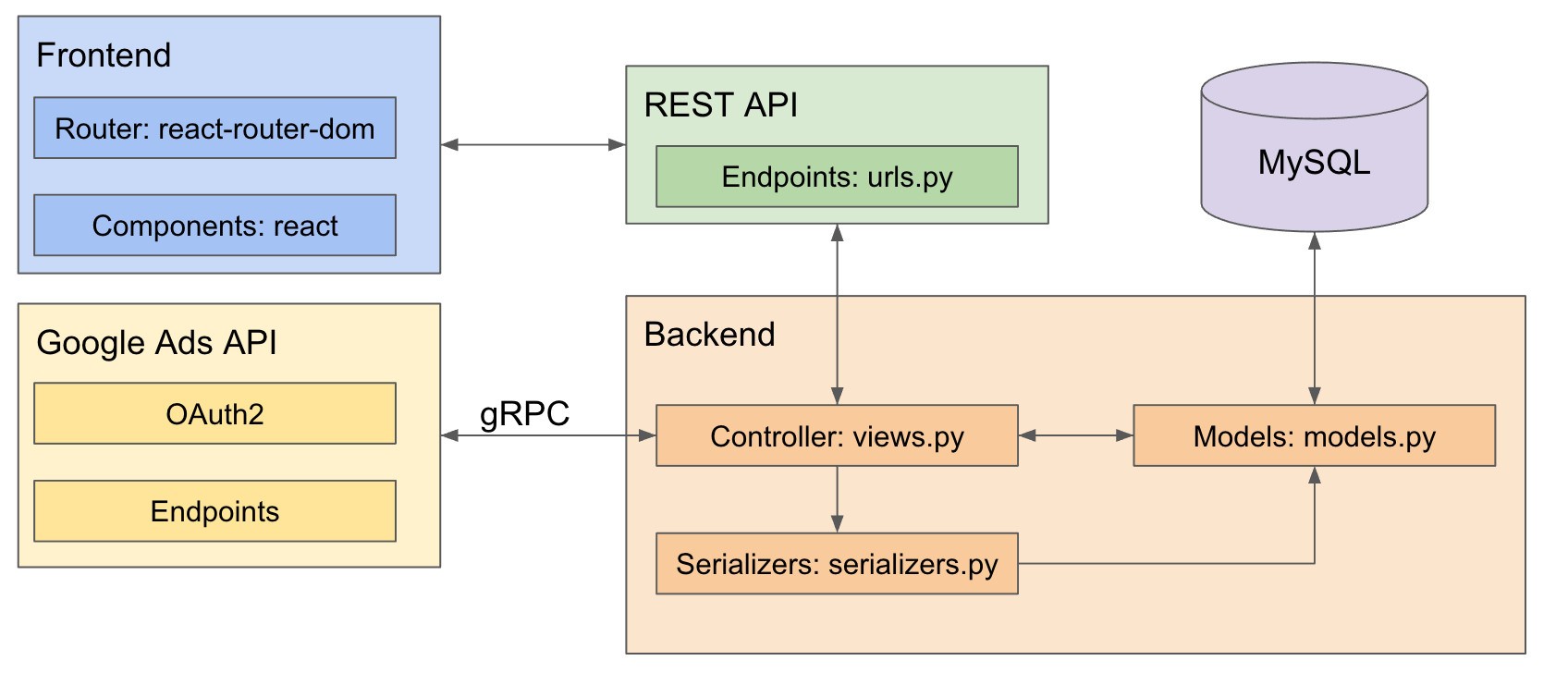
Anyone can use the app, called Fran Ads, to save significant time on product development. Just follow the simple installation steps in the README files (frontend README file and backend README file) on the GitHub repo! The app uses React for the frontend, and Django for the backend; two of the most popular web frameworks.

App's Logo


Check out a product demo here! You can have this app running in your local machine in a few minutes. To learn how, check out the video tutorial.

Blasco acts as an external Product Manager for Google’s strategic partners, driving the entire product development lifecycle. He created this project to help Google’s partners and businesses seeking to offer Google Ads to their users.

The goal is to accelerate the Google Ads integration process and decrease associated development costs. Some companies are using Fran Ads to see what an integration looks like, while others are using the technical guide to learn how to start using the Google Ads API.

In general, companies can use Fran Ads as an SDK to begin working with elements within the Google Ads API, and serve as a guidance system for integrating with Google. This project will minimize the number of times the wheel needs to be reinvented, accelerating innovation and facilitating adoption. Developers can clone the code repositories, follow the steps, and have a web app integrated with Google Ads in just a few minutes. They can adapt and build on top of this project, or they can just use the functions they need for the features they want to develop


App Architecture

Furthermore, you will learn how to create credentials to consume Google APIs; specifically, the README files show how to create a project on Google Cloud Platform (GCP), and how to set it up correctly so a web app can consume Google Ads API and Business Profile APIs.

Also, you will learn how refresh tokens work for Google APIs, and how to manage them for your web application.

Francisco wrote a detailed technical guide explaining how to build every feature of the app. Some of the most important features are:
        1. Create a new Google Ads account
        2. Link an existing Google Ads account
        3. OAuth authentication & authorization
        4. Refresh token management
        5. List of Google Ads accounts associated with Google account
        6. Reporting on performance for all campaign types
        7. Create Smart Campaign (automated ads on Google and across the web)
        8. Edit Smart Campaign settings

As you can see from the list above, the app will create Smart Campaigns — a simplified, automated campaign designed for new advertisers and SMBs

Google made public the suggestion services through the Google Ads API. Fran Ads uses those services to recommend keyword themes, headlines & descriptions for the ad, and budget. These recommendations are specific for each advertiser, depending on several factors such as type of business, location, and keyword themes.
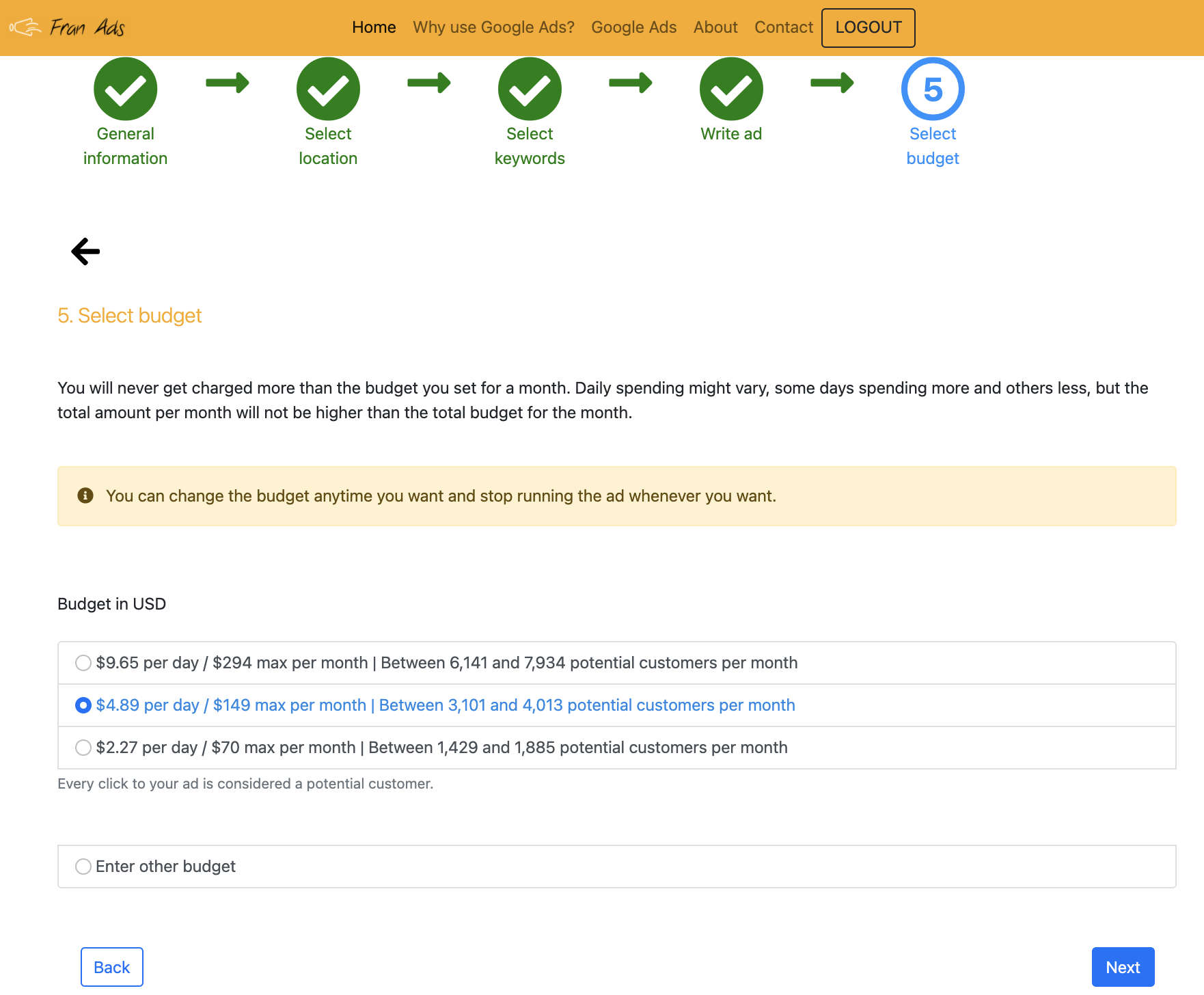


An example of three Google recommendations for an advertiser.


The image above shows the final step of creating a Smart Campaign on Fran Ads. In this step, users have to set a daily budget for the campaign. Not only will you receive recommendations for the budget, but an estimate of how many ad clicks you will get per month. This is a great feature for users who are new to digital marketing and aren’t aware of their spending needs.

You can also see an alert message that the budget can be changed anytime, so users can pause spending on the campaign. This is important because many new users, especially SMBs, have doubts about spending on something new. Therefore, it is important to communicate to them that the decision they are making at that moment is not set in stone.

When you start using Fran Ads, you will see there is guidance so users complete the tasks they want.


Guidance on how to complete tasks based on Google’s best practices.


Furthermore, the app is designed based on Google’s best practices. For example, when users are creating a Smart Campaign, in step three (see the above image) they need to select keyword themes (group of keywords). If you choose “bakery” as the keyword theme, your ad is eligible to show when people search for “bakery near me”, “local bakery”, and “cake shop”.

Google’s best practices suggest that advertisers use between seven and ten keyword themes per campaign. Therefore, Fran Ads is designed for users to select up to seven keyword themes. Refer to the image of step three when creating a Smart Campaign on Fran Ads. However, you can set it to ten if you like.

The technical guide also provides:

        1. Production-ready code for both the frontend and backend
        2. Engineering flow diagrams
        3. Best practices
        4. High-fidelity mockups
        5. App architecture and structure diagrams
        6. Workarounds to current bugs on Google Ads API v9
        7. Important information on how to handle important tasks necessary for integrating your platform with Google Ads
        8. Help with the design strategy for the UX and design elements of the UI.

Important resources

See below the list summarizing the important resources that will help you integrate with Google Ads easier, faster, and better.
        1. Frontend repo: all the code for the frontend of Fran Ads.
        2. Backend repo: all the code for the backend of Fran Ads.
        3. Technical guide: 3 sections: ‘Before Starting’, ‘Configurations & Installation’, and ‘Build web              app’. In section 3, you have explanations on how to build all the features of the app.
        4. Product demo: 15-minute demo of Fran Ads showing many core features.
        5. Video tutorial: 17-minute tutorial on how to set up and run Fran Ads.


By Francisco Blasco – Launch, Channel Partners

Google Cardboard XR Plugin for Unity

Tuesday, May 26, 2020

Late in 2019, we decided to open source Google Cardboard. Since then, our developer community has had access to create a plethora of experiences on both iOS and Android platforms, while reaching millions of users around the world. While this release has been considered a success by our developer community, we also promised that we would release a plugin for Unity. Our users have long preferred developing Cardboard experiences in Unity, so we made it a priority to develop a Unity SDK. Today, we have fulfilled that promise, and the Google Cardboard open source plugin for Unity is now available via the Unity Asset Store

What's Included in the Cardboard Unity SDK

Today, we’re releasing the Cardboard Unity SDK to our users so that they can continue creating smartphone XR experiences using Unity. Unity is one of the most popular 3D and XR development platforms in the world, and our release of this SDK will give our content creators a smoother workflow with Unity when developing for Cardboard.

In addition to the Unity SDK, we are also providing a sample application for iOS/Android, which will be a great aid for developers trying to debug their own creations. This release not only fulfills a promise we made to our Cardboard community, but also shows our support, as we move away from smartphone VR and leave it in the more-than-capable hands of our development community.


If you’re interested in learning how to develop with the Cardboard open source project, please see our developer documentation or visit the Google VR GitHub repo to access source code, build the project, and download the latest release.

By Jonathan Goodlow, Product Manager, AR & VR

Open sourcing the Firebase SDKs

Wednesday, May 17, 2017

Today, at Google I/O 2017, we are pleased to announce that we are taking our first steps towards open sourcing our client libraries. By making our SDKs open, we’re aiming to show our commitment to greater transparency and to building a stronger developer community. To help further that goal, we’ll be using GitHub as a core part of our own toolchain to enable all of you to contribute as well. As you find issues in our code, from inconsistent style to bugs, you can file issues through the standard GitHub issue tracker. You can also find our project in the Google Open Source directory. We’re really looking forward to your pull requests!

What’s open?

We’re starting by open sourcing several products in our iOS, JavaScript, Java, Node.js and Python SDKs. We'll be looking at open sourcing our Android SDK as well. The SDKs are being licensed under Apache 2.0, the same flexible license as existing Firebase open source projects like FirebaseUI.

Let's take a look at each repo:

Firebase iOS SDK 4.0

https://github.com/firebase/firebase-ios-sdk

With the launch of the Firebase iOS 4.0 SDKs we have made several improvements to the developer experience, such as more idiomatic API names for our Swift users. By open sourcing our iOS SDKs we hope to provide an additional avenue for you to give us feedback on such features. For this first release we are open sourcing our Realtime Database, Auth, Cloud Storage and Cloud Messaging (FCM) SDKs, but going forward we intend to release more.

Because we aren't yet able to open source some of the Firebase components, the full product build process isn't available. While you can use this repo to build a FirebaseDev pod, our libraries distributed through CocoaPods will continue to be static frameworks for the time being. We are continually looking for ways to improve the developer experience for developers, however you integrate.

Our GitHub README provides more details on how you build, test and contribute to our iOS SDKs.

Firebase JavaScript SDK 4.0

https://github.com/firebase/firebase-js-sdk

We are excited to announce that we are open sourcing our Realtime Database, Cloud Storage and Cloud Messaging (FCM) SDKs for JavaScript. We’ll have a couple of improvements hot on the heels of this initial release, including open sourcing Firebase Authentication. We are also in the process of releasing the source maps for our components, which we expect would really improve the debuggability of your app.

Our GitHub repo includes instructions on how you can build, test and contribute.

Firebase Admin SDKs

Node.js: https://github.com/firebase/firebase-admin-node
Java: https://github.com/firebase/firebase-admin-java
Python: https://github.com/firebase/firebase-admin-python

We are happy to announce that all three of our Admin SDKs for accessing Firebase on privileged environments are now fully open source, including our recently-launched Python SDK. While we continue to explore supporting more languages, we encourage you to use our source as inspiration to enable Firebase for your environment (and if you do, we'd love to hear about it!)

We're really excited to see what you do with the updated SDKs - as always reach out to us with feedback or questions in the Firebase-Talk Google Group, on Stack Overflow, via the Firebase Support team, and now on GitHub for SDK issues and pull requests! And to read about the other improvements to Firebase that launched at Google I/O, head over to the Firebase blog.

By Salman Qadri, Firebase Product Manager
.